

Get EX294 Products Practice Material for EX294 Exam Question Preparation
Most Reliable RedHat EX294 Training Materials
The RedHat EX294 exam is a challenging exam that requires candidates to have a deep understanding of Red Hat Enterprise Linux 8 and its various components. The exam consists of practical tasks that require candidates to perform various system administration tasks, such as configuring and managing network services, storage, security, and virtualization. The exam is designed to test the candidate's ability to troubleshoot and solve problems in real-world situations. Candidates who pass this exam will be able to demonstrate their proficiency in managing and administering Red Hat Enterprise Linux 8 systems, which will be a valuable asset in their careers as IT professionals.
The Red Hat EX294 (Red Hat Certified Engineer (RHCE) exam for Red Hat Enterprise Linux 8) Certification Exam is an essential certification for IT professionals who want to demonstrate their expertise in the Red Hat Enterprise Linux 8 operating system. This certification exam is designed to test the candidate's ability to perform advanced system administration tasks in a complex enterprise environment. Candidates who pass this exam demonstrate their ability to configure, manage, and troubleshoot complex networking services, storage solutions, and security policies on Red Hat Enterprise Linux 8.
NEW QUESTION # 13
Install the RHEL system roles package and create a playbook called timesync.yml that:
--> Runs over all managed hosts.
--> Uses the timesync role.
--> Configures the role to use the time server 192.168.10.254 ( Hear in redhat lab
use "classroom.example.com" )
--> Configures the role to set the iburst parameter as enabled.
Answer:
Explanation:
Solution as:
# pwd
home/admin/ansible/
# sudo yum install rhel-system-roles.noarch -y
# cd roles/
# ansible-galaxy list
# cp -r /usr/share/ansible/roles/rhelsystem-roles.timesync .
# vim timesync.yml
---
- name: timesynchronization
hosts: all
vars:
timesync_ntp_provider: chrony
timesync_ntp_servers:
- hostname: classroom.example.com _ in exam its ip-address
iburst: yes
timezone: Asia/Kolkata
roles:
- rhel-system-roles.timesync
tasks:
- name: set timezone
timezone:
name: "{{ timezone }}"
:wq!
timedatectl list-timezones | grep india
# ansible-playbook timesync.yml --syntax-check
# ansible-playbook timesync.yml
# ansible all -m shell -a 'chronyc sources -v'
# ansible all -m shell -a 'timedatectl'
# ansible all -m shell -a 'systemctl is-enabled chronyd'
NEW QUESTION # 14
Create a file in /home/sandy/ansible/ called report.yml. Using this playbook, get a file called report.txt (make it look exactly as below). Copy this file over to all remote hosts at /root/report.txt. Then edit the lines in the file to provide the real information of the hosts. If a disk does not exist then write NONE.
Answer:
Explanation:
Solution as:

NEW QUESTION # 15
Create a playbook /home/bob /ansible/motd.yml that runs on all inventory hosts and docs the following: The playbook should replaee any existing content of/etc/motd in the following text. Use ansible facts to display the FQDN of each host On hosts in the dev host group the line should be "Welcome to Dev Server FQDN".
On hosts in the webserver host group the line should be "Welcome to Apache Server FQDN".
On hosts in the database host group the line should be "Welcome to MySQL Server FQDN".
- A. /home/sandy/ansible/apache.yml

/home/sandy/ansible/roles/sample-apache/tasks/main.yml - B. /home/sandy/ansible/apache.yml

/home/sandy/ansible/roles/sample-apache/tasks/main.yml
Answer: B
NEW QUESTION # 16
Create a jinja template in /home/sandy/ansible/ and name it hosts.j2. Edit this file so it looks like the one below. The order of the nodes doesn't matter. Then create a playbook in /home/sandy/ansible called hosts.yml and install the template on dev node at /root/myhosts
- A. Solution as:

- B. Solution as:

Answer: A
NEW QUESTION # 17
Create a playbook /home/bob /ansible/motd.yml that runs on all inventory hosts and docs the following: The playbook should replaee any existing content of/etc/motd in the following text. Use ansible facts to display the FQDN of each host
On hosts in the dev host group the line should be "Welcome to Dev Server FQDN".
On hosts in the webserver host group the line should be "Welcome to Apache Server FQDN".
On hosts in the database host group the line should be "Welcome to MySQL Server FQDN".
Answer:
Explanation:
/home/sandy/ansible/apache.yml
/home/sandy/ansible/roles/sample-apache/tasks/main.yml
Topic 2, LAB SETUP - 2
control.realmX.example.com _ workstation.lab.example.com
node1.realmX.example.com _ servera.lab.example.com
node2.realmX.example.com _ serverb.lab.example.com
node3.realmX.example.com _ serverc.lab.example.com
node4.realmX.example.com _ serverd.lab.example.com
node5.realmX.example.com
- username:root, password:redhat
- username:admin, password:redhat
note1. don't change 'root' or 'admin' password.
note2. no need to create ssh-keygen for access, its pre-defined
note3. SELinux is in enforcing mode and firewalld is disabled/stop on whole managed hosts.
NEW QUESTION # 18
Create and run an Ansible ad-hoc command.
--> As a system administrator, you will need to install software on the managed
nodes.
--> Create a shell script called yum-pack.sh that runs an Ansible ad-hoc command to
create yum-repository on each of the managed nodes as follows:
--> repository1
-----------
1. The name of the repository is EX407
2. The description is "Ex407 Description"
3. The base URL is http://content.example.com/rhel8.0/x86_64/dvd/BaseOS/
4. GPG signature checking is enabled
5. The GPG key URL is http://content.example.com/rhel8.0/x86_64/dvd/RPM-GPG-KEYredhat-
release
6. The repository is enabled
--> repository2
-----------
1. The name of the repository is EXX407
2. The description is "Exx407 Description"
3. The base URL is http://content.example.com/rhel8.0/x86_64/dvd/AppStream/
4. GPG signature checking is enabled
5. The GPG key URL is http://content.example.com/rhel8.0/x86_64/dvd/ RPM-GPG-KEYredhat-
release
6. The repository is enabled
Answer:
Explanation:
Solution as:
# pwd
/home/admin/ansible
# vim yum-pack.sh
#!/bin/bash
ansible all -m yum_repository -a 'name=EX407 description="Ex407 Description"
baseurl=http://content.example.com/rhel8.0/x86_64/dvd/BaseOS/ gpgcheck=yes
gpgkey=http://content.example.com/rhel8.0/x86_64/dvd/RPM-GPG-KEY-redhat-release
enabled=yes'
ansible all -m yum_repository -a 'name=EXX407 description="Exx407 Description"
baseurl=http://content.example.com/rhel8.0/x86_64/dvd/AppStream/ gpgcheck=yes
gpgkey=http://content.example.com/rhel8.0/x86_64/dvd/RPM-GPG-KEY-redhat-release
enabled=yes'
:!wq
# chmod +x yum-pack.sh
# bash yum-pack.sh
# ansible all -m command -a 'yum repolist all'
NEW QUESTION # 19
Create a role called apache in "/home/admin/ansible/roles" with the following
requirements:
--> The httpd package is installed, enabled on boot, and started.
--> The firewall is enabled and running with a rule to allow access to the web server.
--> template file index.html.j2 is used to create the file /var/www/html/index.html
with the output:
Welcome to HOSTNAME on IPADDRESS
--> Where HOSTNAME is the fqdn of the managed node and IPADDRESS is the IP-Address of
the managed node.
note: you have to create index.html.j2 file.
--> Create a playbook called httpd.yml that uses this role and the playbook runs on
hosts in the webservers host group.
Answer:
Explanation:
Solution as:
----------
# pwd
/home/admin/ansible/roles/
# ansible-galaxy init apache
# vim apache/vars/main.yml
---
# vars file for apache
http_pkg: httpd
firewall_pkg: firewalld
http_srv: httpd
firewall_srv: firewalld
rule: http
webpage: /var/www/html/index.html
template: index.html.j2
:wq!
# vim apache/tasks/package.yml
---
- name: Installing packages
yum:
name:
- "{{http_pkg}}"
- "{{firewall_pkg}}"
state: latest
:wq!
# vim apache/tasks/service.yml
---
- name: start and enable http service
service:
name: "{{http_srv}}"
enabled: true
state: started
- name: start and enable firewall service
service:
name: "{{firewall_srv}}"
enabled: true
state: started
:wq!
# vim apache/tasks/firewall.yml
---
- name: Adding http service to firewall
firewalld:
service: "{{rule}}"
state: enabled
permanent: true
immediate: true
:wq!
# vim apache/tasks/webpage.yml
---
- name: creating template file
template:
src: "{{template}}"
dest: "{{webpage}}"
notify: restart_httpd
!wq
# vim apache/tasks/main.yml
# tasks file for apache
- import_tasks: package.yml
- import_tasks: service.yml
- import_tasks: firewall.yml
- import_tasks: webpage.yml
:wq!
# vim apache/templates/index.html.j2
Welcome to {{ ansible_facts.fqdn }} on {{ ansible_facts.default_ipv4.address }}
# vim apache/handlers/main.yml
---
# handlers file for apache
- name: restart_httpd
service:
name: httpd
state: restarted
:wq!
# cd ..
# pwd
/home/admin/ansible/
# vim httpd.yml
---
- name: Including apache role
hosts: webservers
pre_tasks:
- name: pretask message
debug:
msg: 'Ensure webserver configuration'
roles:
- ./roles/apache
post_tasks:
- name: Check webserver
uri:
url: "http://{{ ansible_facts.default_ipv4.address }}"
return_content: yes
status_code: 200
:wq!
# ansible-playbook httpd.yml --syntax-check
# ansible-playbook httpd.yml
# curl http://serverx
NEW QUESTION # 20
Rekey an existing Ansible vault as follows:
-----------------------------------------------
* Download Ansible vault from http:// classroom.example.com /secret.yml to /home/
admin/ansible/
* The current vault password is curabete
* The new vault password is newvare
* The vault remains in an encrypted state with the new password
Answer:
Explanation:
Solution as:
# pwd
/home/admin/ansible/
# wget http://classroom.example.com/secret.yml
# chmod 0600 newpassword.txt
# ansible-vault rekey vault.yml --new-vault-password-file=newpassword.txt
NEW QUESTION # 21
Install and configure Ansible on the control-node control.realmX.example.com as
follows:
-------------------------------------------------------------------------------------------
--> Install the required packages
--> Create a static inventory file called /home/admin/ansible/inventory as follows:
node1.realmX.example.com is a member of the dev host group
node2.realmX.example.com is a member of the test host group
node3.realmX.example.com & node4.realmX.example.com are members of the prod
host group
node5.realmX.example.com is a member of the balancers host group.
prod group is a member of the webservers host group
--> Create a configuration file called ansible.cfg as follows:
--> The host inventory file /home/admin/ansible/inventory is defined
--> The location of roles used in playbooks is defined as /home/admin/ansible/ roles
Answer:
Explanation:
Solution as:
Through physical host, login to workstation.lab.example.com with user root.
# ssh [email protected]
# hostname
workstation.lab.example.com
# yum install platform-python*
# su - admin
# pwd
/home/admin/
# vim .vimrc
# mkdir -p ansible/roles
# cd ansible
# vim inventory
[dev]
servera.lab.example.com
[test]
serverb.example.com
[prod]
serverc.example.com
serverd.example.com
[balancer]
serverd.lab.example.com
[webservers:children]
prod
:!wq
# vim ansible.cfg
[defaults]
inventory = ./inventory
role_path = ./roles
remote_user = admin
ask_pass = false
[privilege_escalation]
become = true
become_method = sudo
become_user = root
become_ask_pass = false
:!wq
# ansible all --list-hosts
NEW QUESTION # 22
Create a playbook called webdev.yml in 'home/sandy/ansible. The playbook will create a directory Avcbdev on dev host. The permission of the directory are 2755 and owner is webdev. Create a symbolic link from /Webdev to /var/www/html/webdev. Serve a file from Avebdev7index.html which displays the text "Development" Curl http://node1.example.com/webdev/index.html to test
- A. Solution as:

- B. Solution as:

Answer: B
NEW QUESTION # 23
Install and configure ansible
User sandy has been created on your control node with the appropriate permissions already, do not change or modify ssh keys. Install the necessary packages to run ansible on the control node. Configure ansible.cfg to be in folder /home/sandy/ansible/ansible.cfg and configure to access remote machines via the sandy user. All roles should be in the path /home/sandy/ansible/roles. The inventory path should be in /home/sandy/ansible/invenlory.
You will have access to 5 nodes.
node1.example.com
node2.example.com
node3.example.com
node4.example.com
node5.example.com
Configure these nodes to be in an inventory file where node I is a member of group dev. nodc2 is a member of group test, node3 is a member of group proxy, nodc4 and node 5 are members of group prod. Also, prod is a member of group webservers.
- A. In/home/sandy/ansible/ansible.cfg
[defaults]
inventory=/home/sandy/ansible/inventory
roles_path=/home/sandy/ansible/roles
remote_user= sandy
host_key_checking=false
[privilegeescalation]
become=true
become_user=root
become_ask_pass=false
In /home/sandy/ansible/inventory
[dev]
node 1 .example.com
[test]
node2.example.com
node4.example.com
node5 .example.com
[webservers:children]
prod - B. In/home/sandy/ansible/ansible.cfg
[defaults]
inventory=/home/sandy/ansible/inventory
roles_path=/home/sandy/ansible/roles
remote_user= sandy
host_key_checking=false
[privilegeescalation]
become=true
become_user=root
become_method=sudo
become_ask_pass=false
In /home/sandy/ansible/inventory
[dev]
node 1 .example.com
[test]
node2.example.com
[proxy]
node3 .example.com
[prod]
node4.example.com
node5 .example.com
[webservers:children]
prod
Answer: B
NEW QUESTION # 24
Create a playbook called issue.yml in /home/sandy/ansible which changes the file /etc/issue on all managed nodes: If host is a member of (lev then write "Development" If host is a member of test then write "Test" If host is a member of prod then write "Production"
- A. Solution as:

- B. Solution as:

Answer: B
NEW QUESTION # 25
Create a role called sample-apache in /home/sandy/ansible/roles that enables and starts httpd, enables and starts the firewall and allows the webserver service. Create a template called index.html.j2 which creates and serves a message from /var/www/html/index.html Whenever the content of the file changes, restart the webserver service.
Welcome to [FQDN] on [IP]
Replace the FQDN with the fully qualified domain name and IP with the ip address of the node using ansible facts. Lastly, create a playbook in /home/sandy/ansible/ called apache.yml and use the role to serve the index file on webserver hosts.
- A. Option
/home/sandy/ansible/roles/sample-apache/tasks/main.yml
/home/sandy/ansible/roles/sample-apache/templates/index.html.j2
In /home/sandy/ansible/roles/sample-apache/handlers/main.yml
- B. Option
/home/sandy/ansible/roles/sample-apache/tasks/main.yml
/home/sandy/ansible/roles/sample-apache/templates/index.html.j2
In /home/sandy/ansible/roles/sample-apache/handlers/main.yml
Answer: A
NEW QUESTION # 26
Create a file called requirements.yml in /home/sandy/ansible/roles a file called role.yml in /home/sandy/ansible/. The haproxy-role should be used on the proxy host. And when you curl http://node3.example.com it should display "Welcome to node4.example.com" and when you curl again "Welcome to node5.example.com" The php-role should be used on the prod host.
- A. Solution as:

Check the proxy host by curl http://node3.example.com - B. Solution as:

Check the proxy host by curl http://node3.example.com
Answer: A
NEW QUESTION # 27
Create a file called requirements.yml in /home/sandy/ansible/roles a file called role.yml in /home/sandy/ansible/. The haproxy-role should be used on the proxy host. And when you curl http://node3.example.com it should display "Welcome to node4.example.com" and when you curl again "Welcome to node5.example.com" The php-role should be used on the prod host.
Answer:
Explanation:
Solution as:
Check the proxy host by curl http://node3.example.com
NEW QUESTION # 28
In /home/sandy/ansible/ create a playbook called logvol.yml. In the play create a logical volume called Iv0 and make it of size 1500MiB on volume group vgO If there is not enough space in the volume group print a message "Not enough space for logical volume" and then make a 800MiB Iv0 instead. If the volume group still doesn't exist, create a message "Volume group doesn't exist" Create an xfs filesystem on all Iv0 logical volumes. Don't mount the logical volume.
Answer:
Explanation:
Solution as: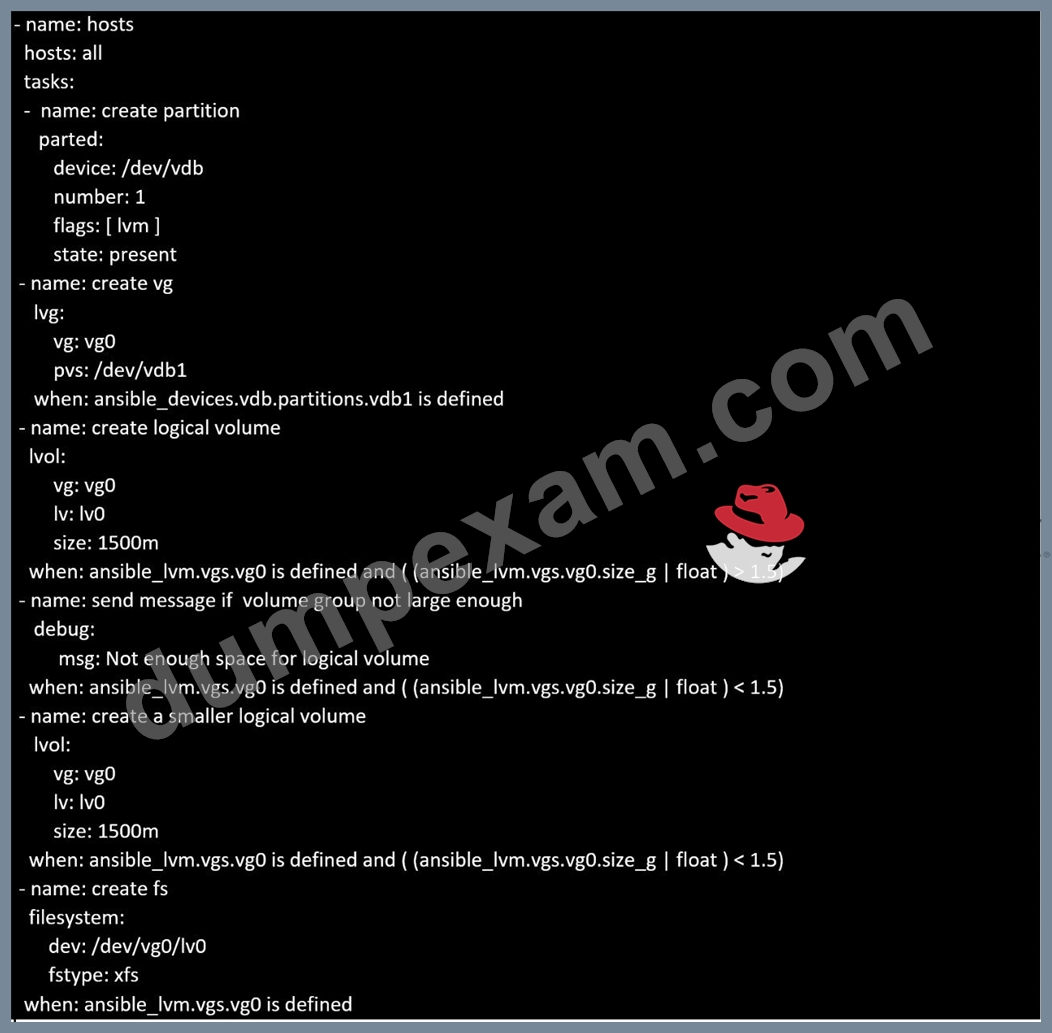
Topic 1, LAB SETUP
You will need to set up your lab by creating 5 managed nodes and one control node.
So 6 machines total. Download the free RHEL8 iso from Red Hat Developers website.
***Control node you need to set up***
You need to create some static ips on your managed nodes then on the control node set them up in the
/etc/hosts file as follows:
vim /etc/hosts
10.0.2.21 node1.example.com
10.0.2.22 node2.example.com
10.0.2.23 node3.example.com
10.0.2.24 node4.example.com
10.0.2.25 node5.example.com
yum -y install ansible
useradd ansible
echo password | passwd --stdin ansible
echo "ansible ALL=(ALL) NOPASSWD:ALL
su - ansible; ssh-keygen
ssh-copy-id node1.example.com
ssh-copy-id node2.example.com
ssh-copy-id node3.example.com
ssh-copy-id node4.example.com
ssh-copy-id node5.example.com
***Each manage node setup***
First, add an extra 2GB virtual harddisk to each control node 1,2,3. Then add an extra hard disk to control
node 4. Do not add an extra hard disk to node 5. When you start up these machines the extra disks should be
automatically located at /dev/sdb (or /dev/vdb depending on your hypervisor).
useradd ansible
echo password | passwd --stdin ansible
echo "ansible ALL=(ALL) NOPASSWD:ALL" > /etc/sudoers.d/ansible
Note python3 should be installed by default, however if it is not then on both the control node and managed
nodes you can install it also set the default python3 if you are having trouble with python2 being the default.
yum -y install python3
alternatives --set python /usr/bin/python3
All machines need the repos available. You did this in RHSCA. To set up locally you just need to do the same
for each machine. Attach the rhel8 iso as a disk to virtualbox, kvm or whatever hypervisor you are using (this
will be /dev/sr0). Then inside the machine:
mount /dev/sr0 to /mnt
Then you will have all the files from the iso in /mnt.
mkdir /repo
cp -r /mnt /repo
vim /etc/yum.repos.d/base.repo
Inside this file:
[baseos]
name=baseos
baseurl=file:///repo/BaseOS
gpgcheck=0
Also the appstream
vim /etc/yum.repos.d/appstream.repo
Inside this file:
[appstream]
name=appstream
baseurl=file:///repo/AppStream
gpgcheck=0
NEW QUESTION # 29
Create a file called requirements.yml in /home/sandy/ansible/roles to install two roles. The source for the first role is geerlingguy.haproxy and geerlingguy.php. Name the first haproxy-role and the second php-role. The roles should be installed in /home/sandy/ansible/roles.
Answer:
Explanation:
in /home/sandy/ansible/roles
vim requirements.yml
Run the requirements file from the roles directory:
ansible-galaxy install -r requirements.yml -p /home/sandy/ansible/roles
NEW QUESTION # 30
Create an ansible vault password file called lock.yml with the password reallysafepw in the /home/sandy/ansible directory. In the lock.yml file define two variables. One is pw_dev and the password is 'dev' and the other is pw_mgr and the password is 'mgr' Create a regular file called secret.txt which contains the password for lock.yml.
Answer:
Explanation:
ansible-vault create lock.yml
New Vault Password: reallysafepw
Confirm: reallysafepw
NEW QUESTION # 31
Create the users in the file usersjist.yml file provided. Do this in a playbook called users.yml located at /home/sandy/ansible. The passwords for these users should be set using the lock.yml file from TASK7. When running the playbook, the lock.yml file should be unlocked with secret.txt file from TASK 7.
All users with the job of 'developer' should be created on the dev hosts, add them to the group devops, their password should be set using the pw_dev variable. Likewise create users with the job of 'manager' on the proxy host and add the users to the group 'managers', their password should be set using the pw_mgr variable.
Answer:
Explanation:
ansible-playbook users.yml -vault-password-file=secret.txt
NEW QUESTION # 32
Create an empty encrypted file called myvault.yml in /home/sandy/ansible and set the password to notsafepw. Rekey the password to iwejfj2331.
- A. ansible-vault create myvault.yml
Create new password: notsafepw Confirm password: notsafepw ansible-vault rekey myvault.yml Current password: notsafepw New password: iwejfj2221 Confirm password: iwejfj2221 - B. ansible-vault create myvault.yml
Create new password: notsafepw Confirm password: notsafepw ansible-vault rekey myvault.yml Current password: notsafepw New password: iwejfj2331 Confirm password: iwejfj2221
Answer: A
NEW QUESTION # 33
Create a playbook called balance.yml as follows:
* The playbook contains a play that runs on hosts in balancers host group and uses
the balancer role.
--> This role configures a service to loadbalance webserver requests between hosts
in the webservers host group.curl
--> When implemented, browsing to hosts in the balancers host group (for example
http://node5.example.com) should produce the following output:
Welcome to node3.example.com on 192.168.10.z
--> Reloading the browser should return output from the alternate web server:
Welcome to node4.example.com on 192.168.10.a
* The playbook contains a play that runs on hosts in webservers host group and uses
the phphello role.
--> When implemented, browsing to hosts in the webservers host group with the URL /
hello.php should produce the following output:
Hello PHP World from FQDN
--> where FQDN is the fully qualified domain name of the host. For example,
browsing to http://node3.example.com/hello.php, should produce the following output:
Hello PHP World from node3.example.com
* Similarly, browsing to http://node4.example.com/hello.php, should produce the
following output:
Hello PHP World from node4.example.com
Answer:
Explanation:
Solution as:
# pwd
/home/admin/ansible/
# vim balancer.yml
---
- name: Including phphello role
hosts: webservers
roles:
- ./roles/phphello
- name: Including balancer role
hosts: balancer
roles:
- ./roles/balancer
:wq!
# ansible-playbook balancer.yml --syntax-check
# ansible-playbook balancer.yml
NEW QUESTION # 34
Create a playbook called regulartasks.yml which has the system that append the date to /root/datefile every day at noon. Name is job 'datejob'
Answer:
Explanation:
Solution as:
NEW QUESTION # 35
......
LATEST EX294 Exam Practice Material: https://www.dumpexam.com/EX294-valid-torrent.html
The Realest Study Materials EX294 Dumps: https://drive.google.com/open?id=19envt4IU72WZSCRA0TJaF6n650FysKkW
